PokeMMO+ Bot Documentation
Complete guide to the PokeMMO+ bot — the most popular PokeMMO bot for automated shiny hunting, battles, and route farming. Covers all battle modes, behaviors, 76+ routes, premium features, security, and settings.
Installation
Get up and running in minutes
Game Settings
Required PokeMMO configuration
Hotkeys
Global and game hotkey setup
Features
Fight, Catch, Pay Day, Thief & more
Installation
- Disable all Mods & Themes
- Use English Language and English ROMs
- Start the loader as Admin
- Start the bot as Admin
- Apply Properties & Patch GFX on the Settings Page of the bot
- Start the game as Admin
- Press Unlock then Free Access and wait or login into your premium account
Game Settings
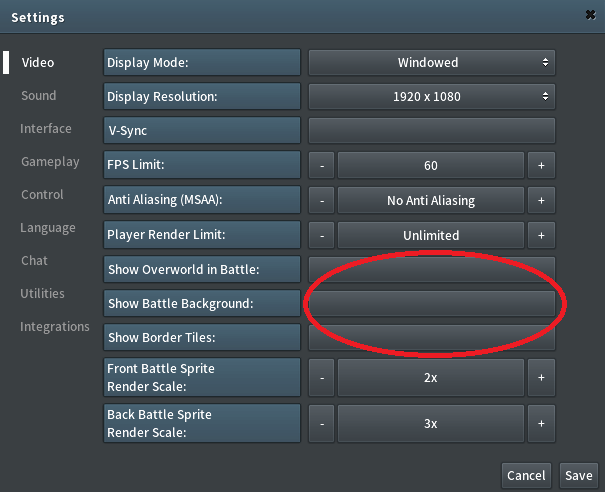
Ensure the following PokeMMO settings are configured correctly:
- Display Mode: Windowed Mode
- UI Scaling: 1.0x
- PokeMMO Resolution: 1920x1080 (HD) or 1280x720 (SD)
- Bot Profile: detected automatically from PokeMMO's configured width and height; a slightly reduced height caused by window chrome is recognized
- FPS Limit: 60 FPS (recommended for stable routes)
- Your Windows desktop resolution and DPI scaling do not need to match the game resolution; for example, 4K at 200% scaling is supported
- The Windows taskbar may be visible, auto-hidden, or positioned on another screen edge
- Multiple monitors are supported; keep the game visible and unobstructed while the bot is running
- Fast Walking (in your settings) has to be toggled on
Hotkeys
Global Hotkeys
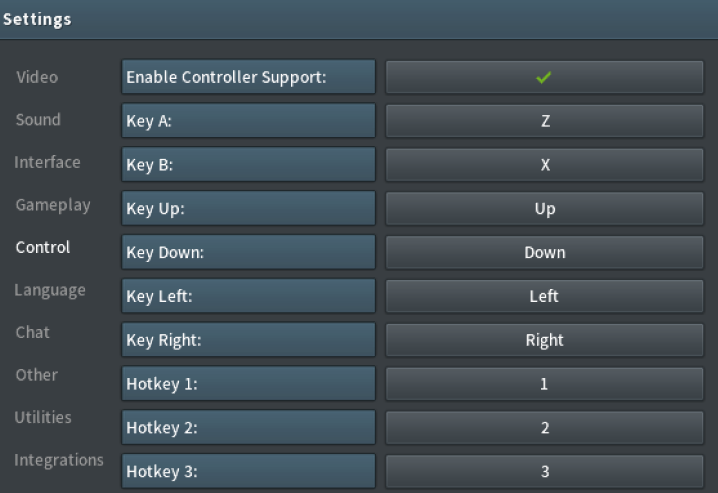
Press F9 to start the Bot or press F10 to stop the Bot.
Game Hotkey Slots

Battle Modes
Fight Free
Fight automatically in encounters.
Chooses the most effective attacks. (Super effective -> Effective -> Random)
- If none of your moves is super effective or effective against your opponent, it chooses a random move out of the 4; when choosing a random move, it will never choose the same move twice in a row.
- Per-slot move rotation for cycling through effective moves — doesn't use only the same effective move the whole time.
- Immune moves are automatically excluded from random selection.
- Detects disabled moves and doesn't use the disabled move(s).
- Trainer battle cant-run detection with automatic fallback to fighting.
- Switches automatically to the next pokemon when your pokemon dies.
- Horde encounters are supported.
Will instantly switch to the second pokemon in battles to level up the first one.
Run Free
Run automatically in encounters. As simple as it is!
Catch Free
Catch Pokemon automatically in encounters.
Please note that it will use all of your pokeballs you have in your bag until you catch the pokemon.
Will release pokemon that doesn't have at least 1 IV 31. The bot will only check pokemon that you've caught. It will not release any shinies. The stats window must be in default position (center of your screen), to reset the position (if you moved it) restart PokeMMO.
Catch only specific Pokemon. You have to make a screenshot of the pokemon name and put it into the \bin\img folder of the bot directory.

Catch every Pokemon you encounter.

Catch only Pokemon you don't have.

Will automatically use Catch Moves before catching a Pokemon. You can select multiple moves from the dropdown: Substitute, False Swipe, Spore, Assist, and Soak.
The execution order depends on the selected Catch Moves Routine. See the Catch Moves Routine section for details.
Choose which Poke Ball type to use when catching. Available options: Poke Ball, Great Ball, Ultra Ball, Repeat Ball, Dusk Ball, Dive Ball. If the selected ball is not found in your bag, the bot falls back to the default ball.
If checked the bot will instantly switch to the second pokemon in battles to catch with. Can be used to sync pokemon and to not encounter pokemons with your catcher.
Pay Day 💎 Premium
Uses Pay Day against Pokemon to farm money!
It's encouraged to have multiple pokemon in your party that know this move for maximum efficiency. When you run out of PP for Pay Day, it will switch to the next pokemon in your party. Pay Day has to be placed in Move Slot 1.
Every Auto Sweet Scent, Auto Walk & Auto Fish Route is supported.
If you check the checkbox it will switch to the next Pay Day Pokemon when the PP of Pay Day hits 0, until the last Pokemon in your party also have 0 PP it will go back to Pokecenter and heal. (for Auto Walk/Auto Fish) For Auto Sweet Scent, its active by default, since you walk back when PP of Sweet Scent hits 0.
Will automatically use move 2 after using Pay Day (for example an AoE move to clear up hordes easier). Make sure that the AoE move you'd like to use is in Move Slot 2.
Choose what happens when a horde encounter appears in Pay Day mode.
- Farm Horde — Fight the horde using Pay Day moves (default).
- Run Horde — Run from horde encounters. Falls back to fighting if running is not possible (e.g. trainer battles). Shiny Pokemon are always detected and caught first.
Pay Day + Catch [Mixed] 💎 Premium
Uses Pay Day or Catch depending on your settings!
If the encountered Pokemon matches your catch filter (Uncaught or a specific Pokemon name), it will Catch it. Otherwise, it uses Pay Day for money farming. This lets you farm money while also catching Pokemon you need.
Thief 💎 Premium
Uses Thief against Pokemon to steal their item for money!
It's encouraged to have multiple pokemon in your party that know this move for maximum efficiency. When you run out of PP for Thief, it will switch to the next pokemon in your party. Thief has to be placed in Move Slot 1.
Every Auto Sweet Scent, Auto Walk & Auto Fish Route is supported.
Your Pokemon should have the ability "Frisk" to detect the opponent's items. (ex: Shuppet)
If you check the checkbox it will switch to the second Thief Pokemon in order to get the second item. This option is slower but it makes sure you don't miss any items.
Will automatically use Imprison before using Thief. Imprison has to be placed in Move Slot 2.
Pay Day + Thief [Mixed] 💎 Premium
Uses Thief or Pay Day depending on your settings!
Uses Thief on matching Pokemon (steals their items), and Pay Day on non-matching Pokemon for money farming. First Pokemon needs to have Thief with Frisk ability. Next Pokemon is your Pay Day Pokemon (can be stacked up).

Pickpocket 💎 Premium
Steals items from horde Pokemon using Imprison + Pickpocket ability!
Pokemon 1 needs to have the Frisk ability to detect items and Imprison in Move Slot 2 (blocks Hypnosis).
Pokemon 2 needs to have the Pickpocket ability (steals items when hit by the opponent).
Every Auto Sweet Scent, Auto Walk & Auto Fish Route is supported.
Automatically swaps your sleep Pokemon back to the front of your party after stealing an item. The bot detects the sleep status icon on your party bar and uses "Move To Front" to rearrange your team. After healing at the Pokecenter, the sleep Pokemon is swapped back to front so it's ready for the next encounter.
The bot dynamically detects your party bar layout in battle (both vertical and horizontal orientations) and calculates all 6 slot positions automatically.
Safari 💎 Premium
Catch automatically in Safari encounters.
Will release pokemon that doesn't have at least 1 IV 31. The bot will only check pokemon that you've caught. It will not release any shinies.
- Rock — Will automatically Throw a Rock before trying to catch the Pokemon.
- Bait — Will automatically Throw a Bait before trying to catch the Pokemon.
- Auto Safari Walk — Will use the 'Auto Safari Walk Route' to walk to the spot and start to walk.
- Auto Safari Fish — Will use the 'Auto Safari Fish Route' to walk to the spot and start to fish.
None Free
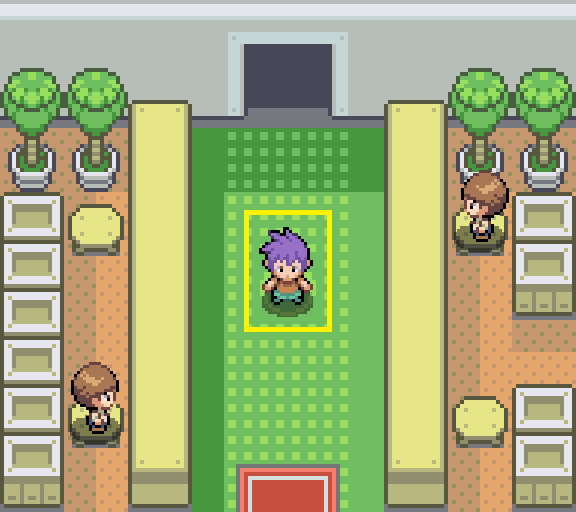
Does nothing in encounters so you can battle manually.
This feature is useful if you only want to use other features but battle manually. Or if you want to combine the Bot with PokeMate. For example use the Routes of PokeMMO+ but the Battle Mechanism of the PokeMate API.
Non-Battle Modes
Sell Box Free
Sells automatically all Pokemon in the current opened box on the GTL.
You can set a Sell Price in the text field — this is the price each Pokemon will be listed for on the GTL. Make sure to stand in front of the PC and have the box opened which you want to sell. The box window must be in default position (center of your screen), to reset the position (if you moved it) restart PokeMMO.
Mail Claim Free
Will automatically claim all mails from the PC when the Mail Window is opened.
The mail window must be in default position (center of your screen), to reset the position (if you moved it) restart PokeMMO.
GTL Sniper 💎 Premium
Automatically snipes Pokemon from the GTL (Global Trade Link).
The bot will refresh the GTL listing, search for a buy button, and purchase the Pokemon. If successful, a Discord notification is sent. If you run out of money, the bot stops and notifies you.
Behaviors
Walk Free
Walk automatically.
You can change the Walk Direction from Left-Right, Up-Down, Squares and Random.
Fish Free
Fish automatically.
Rod needs to be placed on Hotkey Slot 1 in the Action Bar.
Sweet Scent Free
Use Sweet Scent automatically until you run out of PP.
After it runs out, the bot won't use sweet scent anymore until you manually fill it back up or combine it with Auto Refill Sweet Scent PP. Can be used at any spot.
Auto Walk Premium 💎
Walk automatically until you run out of any of your PP and automatically restore PP.
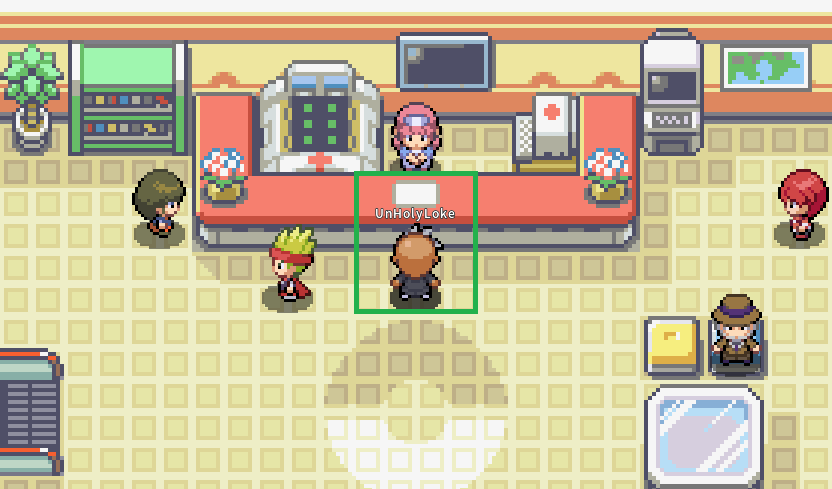
Will use the selected "Auto Walk Route" to walk to the spot. When you arrive at the spot it will start to Walk. After you run out of PP of any of your moves, the bot will walk back to the PokeCentre to restore your pokemon's PP. In order to use this, your bike should be equipped in Hotkey Slot 2 and Dig or Escape Rope on Hotkey Slot 3. Fast Walking (in your settings) has to be toggled on. You should also have an Abra with Teleport placed on Hotkey Slot 8. Only usable with "Auto Walk Routes".
Auto Fish Premium 💎
Fish automatically until you run out of any of your PP and automatically restore PP.
Will use the selected "Auto Fish Route" to walk to the spot. When you arrive at the spot it will start to Fish. After you run out of PP of any of your moves, the bot will walk back to the PokeCentre to restore your pokemon's PP. In order to use this, your bike should be equipped in Hotkey Slot 2 and Dig or Escape Rope on Hotkey Slot 3. Fast Walking (in your settings) has to be toggled on. You should also have an Abra with Teleport placed on Hotkey Slot 8. Rod needs to be placed on Hotkey Slot 1 in the Action Bar. Only usable with "Auto Fish Routes".
Auto Sweet Scent Free Premium 💎
Use Sweet Scent automatically until you run out of PP and automatically restore PP.
Will use the selected "Auto Sweet Scent Route" to walk to the spot. When it arrives at the spot it will start to use Sweet Scent. After it runs out, the bot will walk back to the PokeCentre to restore your pokemon's PP (in order to use Sweet Scent again). In order to use this, your bike should be equipped in Hotkey Slot 2 and Sweet Scent on Hotkey Slot 9. Fast Walking (in your settings) has to be toggled on. You should also have an Abra with Teleport placed on Hotkey Slot 8. Only usable with "Auto Sweet Scent Routes".
Auto Safari Walk Premium 💎
Walk automatically inside Safari Zone using a selected route.
The bot will navigate to the Safari Zone walking spot using the selected "Safari Auto Walk Route". Once there, it will walk around to trigger wild encounters. When the Safari timer runs out, the bot automatically re-enters the Safari Zone and continues. Only usable with Safari battle mode and "Safari Auto Walk Routes".
Auto Safari Fish Premium 💎
Fish automatically inside Safari Zone using a selected route.
The bot will navigate to the Safari Zone fishing spot using the selected "Safari Auto Fish Route". Once there, it will fish to trigger wild encounters. If a fishing error occurs, the bot will re-cast. When the Safari timer runs out, the bot automatically re-enters the Safari Zone and continues. Rod needs to be placed on Hotkey Slot 1 in the Action Bar. Only usable with Safari battle mode and "Safari Auto Fish Routes".
Routes Overview
 Sweet Scent
 Bike
Bike Dig / Esc. Rope
 TeleportFREEBike
 CutTeleportPREMIUMBikeTeleportPREMIUMSweet ScentBikeTeleportPREMIUMSweet ScentBike
 SurfTeleportPREMIUMSweet ScentSurfTeleportPREMIUMSweet ScentSurfTeleportPREMIUMSweet ScentBikeDig / Esc. RopeTeleportPREMIUMSweet ScentBikeTeleportPREMIUMSweet ScentBike
 RepelSurfTeleportPREMIUMSweet ScentBikeDig / Esc. RopeRepelSurfTeleportPREMIUMSweet ScentBikeTeleportPREMIUMSweet ScentBikeSurfTeleportPREMIUMSweet ScentBikeTeleportPREMIUMSweet ScentBikeSurfTeleportPREMIUMSweet ScentBikeTeleportPREMIUMBikeDig / Esc. RopeTeleportPREMIUM
 RodPREMIUMBikeTeleportPREMIUMSweet ScentBikeTeleportPREMIUMSweet ScentTeleportPREMIUMSweet ScentBikeSurfTeleportPREMIUMSweet ScentBikeSurfTeleportPREMIUMSweet ScentBikeTeleportPREMIUMBikeDig / Esc. RopeTeleportPREMIUMSweet ScentBikeTeleportPREMIUMSweet ScentSurfTeleportPREMIUMSweet ScentBikeSurfTeleportPREMIUMSweet ScentBikeSurfTeleportPREMIUMSweet ScentBikeDig / Esc. RopeTeleportPREMIUMBikeRodDig / Esc. RopeTeleportPREMIUMBikePREMIUMBikeRepelSurfPREMIUMBikePREMIUMSweet ScentBike
 DefogTeleportPREMIUMSweet ScentBikeSurfTeleportPREMIUMSweet ScentBikeTeleportPREMIUMSweet ScentBikeTeleportPREMIUMSweet ScentBikeTeleportPREMIUMSweet ScentBikeTeleportPREMIUMSweet ScentBikeTeleportPREMIUMSweet ScentBikeTeleportPREMIUMSweet ScentBikeTeleportPREMIUMSweet ScentBikeDig / Esc. RopeTeleportPREMIUMSweet ScentBikeTeleportPREMIUMSweet ScentTeleportPREMIUMSweet ScentBikeSurfTeleportPREMIUMSweet ScentBikeTeleportPREMIUMSweet ScentBikeDig / Esc. RopeTeleportFREESweet ScentBikeTeleportPREMIUMSurfTeleportPREMIUMRodTeleportPREMIUMSweet ScentBikeTeleportPREMIUMSweet ScentBikeSurfTeleportPREMIUMBikeRodTeleportPREMIUMSweet ScentBikeSurfTeleportPREMIUMSweet ScentBikeDig / Esc. RopeTeleportPREMIUMSweet ScentBikeTeleportPREMIUMSweet ScentBikeTeleportPREMIUMSweet ScentBikeTeleportPREMIUMSweet ScentBikeTeleportPREMIUMSweet ScentBikeTeleportPREMIUMSweet ScentBikeTeleportPREMIUMSweet ScentBikeTeleportPREMIUMSweet ScentBikeTeleportPREMIUMSweet ScentBikeDig / Esc. RopeTeleportPREMIUMSweet ScentBikeTeleportPREMIUMSweet ScentBikeTeleportPREMIUMSweet ScentBikeTeleportPREMIUMSweet ScentBikeTeleportPREMIUMSweet ScentBikeTeleportPREMIUMSweet ScentBikeTeleportPREMIUMSweet ScentBikeTeleportPREMIUMSweet ScentBikeTeleportPREMIUMSweet ScentBikeTeleportPREMIUMSweet ScentBikeSurfTeleportPREMIUMSweet ScentBikeTeleportPREMIUMSweet ScentBikeTeleportPREMIUMSweet ScentBikeTeleportPREMIUMSweet ScentBikeSurfTeleportPREMIUMSweet ScentBikeTeleportPREMIUM
Features
Catch Shiny Free
Automatically catches all Shinies in encounters.
Will catch the Shiny with any available pokeballs. The bot will not engage with the pokemon (aside from using pokeballs). It will play a sound when a Shiny is detected. After the Shiny is caught, it will continue normally.
If the shiny is in a horde, the bot will use "Anti AFK Shiny" as described below.
Anti AFK Shiny Free
Will stay afk without getting kicked so you can catch the Shiny yourself.
The bot will not engage with the pokemon. It will play a sound when a Shiny is detected. After the Shiny is caught, it will continue normally.
Anti AFK items must be in your Medicine Bag. (Recommended items: Antidote, Awakening, Burn Heal).
Skip Dialogue, Skip Evolve, Skip Learn New Moves Free
Automatically skips any annoying dialogue for maximum efficiency.
Automatically cancels Pokemon evolution.
Automatically cancels Pokemon learning a new move.
Auto Refill Sweet Scent PP Free
Automatically refill PP when you run out of Sweet Scent PP.
When PP runs out, the bot will trigger the game's PP replenish dialog and automatically confirm usage of any available PP restore item (Leppa Berry, Ether, etc.).
Auto Lure Free
Automatically use and reapply Lures to increase wild encounter rate while walking or fishing.
Lure has to be placed on Hotkey Slot 6. The bot will press the hotkey between encounters and confirm the Lure dialog automatically when it expires.
Auto Refill PP Free
Automatically use a PP restore item (Ether, Leppa Berry, etc.) between encounters to refill moves at 0 PP.
The item has to be placed on Hotkey Slot 7. After every battle, the bot loops through all 6 party Pokemon and only restores moves that are at 0 PP. If no move needs restoring, the item is not consumed.
Choose Poke Ball Free
Choose which Poke Ball type the bot uses when catching Pokemon.
Available ball types: Poke Ball, Great Ball, Ultra Ball, Repeat Ball, Dusk Ball, Dive Ball.
If the selected ball is not found in your bag, the bot falls back to the default Poke Ball. This option is only available when a Catch-based battle mode is selected.
Login Free
Login automatically to avoid getting kicked out of the game.
Can also join existing sessions or login after the afk message.
Premium Features
Potion System 💎 Premium
Automatically uses Potions in encounters when your Pokemon's HP drops.
Potions are used directly from the Bag — no Hotkey Slot needed. The bot opens the Bag, navigates to the Medicine tab, and finds the correct potion by image.
- When Orange HP use — Select which potion to use when HP turns orange: Potion, Super Potion, Hyper Potion, or None.
- When Red HP use — Select which potion to use when HP turns red: Potion, Super Potion, Hyper Potion, or None.
Catch Moves Routine 💎 Premium
Select the order in which Catch Moves are executed. Six routines are available:
- Substitute → False Swipe → Spore
- Spore → Substitute → False Swipe
- Substitute → Spore → False Swipe
- False Swipe → Assist
- Spore → Soak → False Swipe — use when target is immune to Spore
- Soak → Spore → False Swipe — use when target is immune to False Swipe, e.g. Ghost types
Each routine only uses the moves you have selected in the Catch Moves multi-select dropdown. Available moves: Substitute, False Swipe, Spore, Assist, Soak.
Teleport Back 💎 Premium
Will automatically use Teleport instead of walking back the selected Route while using Auto Sweet Scent. Will also use Teleport when you get stuck to reset the Route.
If it is impossible to walk back the way you came from, the bot will attempt to use teleport even if this isn't selected. Please make sure to have teleport in the case that you select a route where you cannot walk back.
Escape Rope 💎 Premium
Will automatically use Escape Rope in holes when you get stuck while using Auto Sweet Scent.
Slow Mode 💎 Premium
A slow mode for Auto Sweet Scent.
If you have a slow or laggy computer, use this while using Auto Sweet Scent for maximum compatibility. You do not need this if you do not get stuck often.
AoE Move (1) 💎 Premium
Will automatically use Move 1 (for example an AoE move to clear up horde easier) when using Auto Walk, Auto Fish, Auto Sweet Scent or Sweet Scent.
Make sure that the AoE move you'd like to use is in Move Slot 1.
Discord Bot 💎 Premium
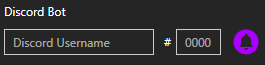
Enter your Discord Username to receive notifications whenever you get a captcha, detect or catch a shiny, steal an item with thief, throw a pokeball & much more.
Attached shiny, captcha, status, and security images capture only the PokeMMO client area. Windows DPI scaling, desktop resolution, taskbar placement, title bars, and the game's position on screen are excluded automatically.
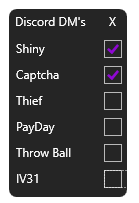
Configure which notifications you receive as Discord DMs:
- Shiny — Always on (cannot be disabled)
- Captcha — Always on (cannot be disabled)
- Thief — When stealing an item with Thief (toggleable)
- PayDay — When collecting coins with Pay Day (toggleable)
- Throw Ball — When throwing Pokeballs (toggleable)
- IV31 — When catching an IV 31 Pokemon (toggleable)
Following commands are also available:
!status <premium login username>— receive status!start <premium login username>— start bot!stop <premium login username>— stop bot
To send the commands just direct message the discord bot POKE+ on the server.
Security
Automatic Captcha Solver 💎 Premium
If you receive a Captcha the Bot will automatically solve the Captcha, enter the Solution and press Submit. You also get Images in Discord DM's of the Solving Process.
Alert after Captcha Free
The bot will alert you after you receive a Captcha in order to avoid being banned.
Premium members also get a discord message with a picture of the Captcha. Can't be turned off always on.
Stop / Alert after Walk Cycles Free
Stop after x Walk Cycles — The bot will stop walking around after x Walk Cycles in order to avoid being banned. It is recommended to set this at around 7.
Alert after x Walk Cycles — The bot will alert you with a sound after x Walk Cycles without encountering a Pokemon to avoid being banned.
Stop / Alert after Whisper Free
Stop after Whisper — The bot will stop after you receive a whisper message in order to avoid being banned.
Alert after Whisper — The bot will alert you after you receive a whisper message in order to avoid being banned.
Alert after 0 Sweet Scent Free
The bot will alert you with a sound after Sweet Scent PP hits 0 to avoid being banned.
Walk Cycles & Walkspeed Free
Walk Cycles — Settings to define when the bot should stop, when no pokemons are encountered anymore by walking to avoid being banned when getting teleported.
Walkspeed — Settings to adjust how long the Walk buttons are pressed. Fully randomized.
Auto Channel Switch Free
Automatically changes the channel after a specific time. Fully randomized.
Close Game / Take a Break Free
Close game and bot — Automatically closes the game and bot after a specific time.
Take a break — Automatically takes a break every x minutes for a certain time. Fully randomized.
Humanize Actions Free
Will do random human behaviors.
Settings
Profiles Free
Profiles let you save and switch between different bot configurations instantly. Each profile is a standalone .ini file stored in the Profiles/ folder next to the bot.
The bot ships with preset profiles to get you started: Basic_Fight, Basic_Run, Basic_Shiny_Farm, and Ditto_Farm_Hoenn. You can create your own profiles and share them with others by simply copying the .ini file.
- Switch — Select a profile from the dropdown. Press Load to apply it.
- Load — Load the selected profile's settings.
- Save — Save current settings to the selected profile.
- Delete — Delete the selected profile.
- New (+) — Create a new profile with the current settings.
- Refresh — Rescan the Profiles folder to pick up manually added .ini files.
- Reset Default Settings — Reset all settings to their default values (does not affect profile files).
Auth credentials (username, password) are stored separately in auth.ini and are never included in profiles, so sharing profiles is safe.
Game Resolution Free
Configure one of these supported resolutions inside PokeMMO:
- HD — 1920x1080
- SD — 1280x720
The bot reads client.graphics.width and client.graphics.height from PokeMMO's config/main.properties file every time Start is pressed and selects the matching image-template profile automatically. Width must be exactly 1920 or 1280. A slightly smaller height caused by the title bar or taskbar is accepted; a substantially different size is reported as unsupported. After correcting an unsupported resolution, press Start again. The bot application does not need to be restarted. While automation is running, the live client size is monitored continuously. If it remains incompatible with the active profile for 10 seconds, automation stops and shows one warning instead of continuing with invalid coordinates. There is no separate resolution setting in the bot.
Apply Properties & Patch GFX Free
Automatically applies properties & patches the GFX file.
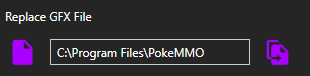
To make the bot work properly in battles you need to apply the properties & patch the GFX file. To do that, select the default path of your PokeMMO folder by clicking the left button. Apply the changes by clicking the right button.
Left Mouse Clicks or Right Mouse Clicks Free
Support for left handed users.
Instead of using left mouse clicks you can switch over to use right mouse clicks.
Humanize Mouse Free
Will do random human mouse behaviors.
When enabled, the mouse moves to targets using a Bezier curve with random wiggle to simulate human-like mouse movement. When disabled, the cursor is instantly teleported to the target position. Enabled by default.
MAC Spoofing 💎 Premium
Spoof or reset your network adapter's MAC address.
- Spoof — Generates a random MAC address and applies it to all network adapters.
- Reset — Restores the original MAC address on all network adapters.
Troubleshooting
If Bot is not working or doesn't click Fight or Run ->
- You must have the game focused. (Foreground)
- Change Display Mode in PokeMMO Video Settings to Windowed Mode
- Set UI Scaling to 1.0x in PokeMMO Interface Settings
- Only use one of the Supported Resolutions 1920x1080 or 1280x720
- The bot detects HD or SD automatically from PokeMMO's settings. Slight height reductions caused by window chrome are supported; other widths or substantially different heights show a clear warning
- Keep the PokeMMO client visible and unobstructed; another window covering the game can also cover the pixels being searched
If Routes are unstable ->
- Change FPS Limit in PokeMMO Video Settings to 60 FPS.
- Fix your internet connection and ensure your FPS is stable.
- If it's still unstable you can get the premium version where an anti stuck and slow mode feature is included.
PokeOne+ Bot Documentation
Complete guide to the PokeOne+ bot — the most popular PokeOne bot for automated shiny hunting and battles. Covers all battle modes, behaviors, premium features, security, and settings.
Installation
Get up and running in minutes
Game Settings
Required PokeOne configuration
Hotkeys
Global and game hotkey setup
Features
Fight, Run, Catch, Scan & more
Installation
- Disable all Mods & Themes
- Start the loader as Admin (1 time only)
- Start the bot as Admin
- Start the game as Admin
- Press Unlock then Free Access and wait or login into your premium account
Game Settings
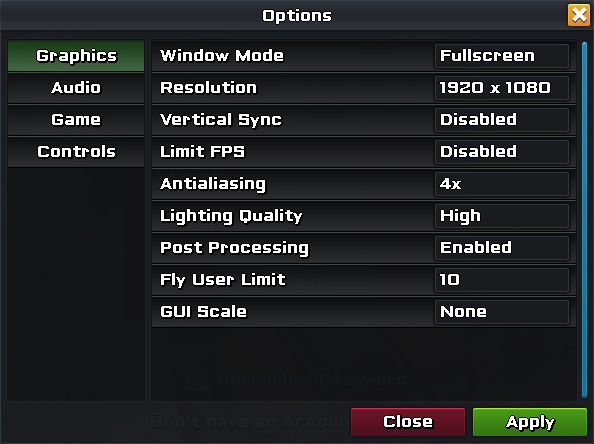
Ensure the following PokeOne settings are configured correctly:
- Display Mode: Fullscreen Mode
- UI Scaling: 1.0x
- Resolution: 1920x1080 or 800x600
- Windows Resolution has also to be same as the PokeOne & Bot Resolution
- It is recommended to use VMWare or purchase a VPS to do this
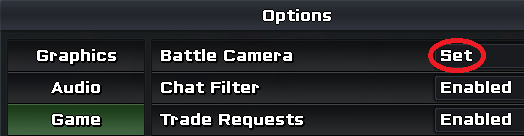
- Battle Camera: Set
Hotkeys
Global Hotkeys
Press F9 to start the Bot or press F10 to stop the Bot.
Game Hotkeys
Battle Modes
Fight Free
Fights automatically in encounters.
Chooses random attacks.
Switches automatically to the next pokemon when your pokemon dies.
Run Free
Run automatically in encounters. As simple as it is!
Catch Free
Catches Pokemon automatically in encounters.
Please note that it will use all of your pokeballs you have in your bag until you catch the pokemon.
Catch Preferred Pokemon 💎 Premium
Catches only the preferred Pokemon automatically in encounters.
You can type in the Pokemon Name, Gender, Ability and Overall Stats and it will only catch the pokemon when all of the conditions are met.
Scan 💎 Premium
Scan Pokemon in encounters without doing anything else.
This feature is useful when you only want to do anything by yourself but also want the enemy pokemons to be scanned. Remember Scan is anyway always on, this feature only prevents you from also doing some other actions like fight etc.
Just split up names or abilities with the character ;
Behaviors
Walk Free
Walk automatically.
You can change the Walk Direction from Left-Right, Up-Down, Squares and Random.
Fish Free
Fish automatically.
Rod needs to be placed on Hotkey Slot 1 in the Action Bar.
Goto Free
Press Goto automatically.
Will try to play parts of the Campaign itself, but as you know most of the parts you need to do a lot of stuff yourself.
Features
Catch Shiny Free
Automatically catches all Shinies in encounters.
Will catch the Shiny with any available pokeballs. The bot will not engage with the pokemon (aside from using pokeballs). It will play a sound when a Shiny is detected. After the Shiny is caught, it will continue normally.
Anti AFK Shiny Free
Will stay afk without getting kicked so you can catch the Shiny yourself.
The bot will not engage with the pokemon. It will play a sound when a Shiny is detected. After the Shiny is caught, it will continue normally.
Level 1st Free
Will instantly switch to the second pokemon in battles to level up the first one.
Only available when "Fight" is activated.
Login Free
Login automatically to avoid getting kicked out of the game.
Premium Features
Chatbot 💎 Premium
Write automatically in random intervals the message you want in the current chat channel.
False Swipe 💎 Premium
Will automatically use False Swipe before catching a Pokemon.
Spore 💎 Premium
Will automatically use Spore before catching a Pokemon.
Discord Bot 💎 Premium
Enter your Discord Username to receive notifications whenever you detect or catch a shiny, steal an item with thief, or throw a pokeball. Type the command !status <premium id> to the POKE+ bot on discord in a private message to receive status updates.
Following commands are also available:
!status <premium id>— receive status!start <premium id>— start bot!stop <premium id>— stop bot
To send the commands just direct message the discord bot POKE+ on the server.
Security
Stop / Alert after Walk Cycles Free
Stop after x Walk Cycles — The bot will stop walking around after x Walk Cycles in order to avoid being banned. It is recommended to set this at around 7.
Alert after x Walk Cycles — The bot will alert you with a sound after x Walk Cycles without encountering a Pokemon to avoid being banned.
Stop / Alert after Whisper Free
Stop after Whisper — The bot will stop after you receive a whisper message in order to avoid being banned.
Alert after Whisper — The bot will alert you after you receive a whisper message in order to avoid being banned.
Close PM Free
The bot will close the PM window when you receive a PM in order to avoid being banned.
Walk Cycles Free
Settings to define when the bot should stop, when no pokemons are encountered anymore by walking to avoid being banned when getting teleported.
Walkspeed Free
Settings to adjust how long the Walk buttons are pressed. Fully randomized.
Settings
Resolution Free
Choose the resolution you are using.
1920x1080 or 800x600 are supported. Game resolution and your computer (Windows) resolution has to be the same. It is recommended to use VMWare or purchase a VPS to do this.
Load / Save Settings Free
Load or save the settings of your bot.
The settings are saved in the same folder in the "settings.ini" file. Your saved settings will be launched on startup of the bot.
Left Mouse Clicks or Right Mouse Clicks Free
Support for left handed users.
Instead of using left mouse clicks you can switch over to use right mouse clicks.
Troubleshooting
Bot is not working or doesn't click Fight or Run ->
- You must have the game focused. (Foreground)
- Change Display Mode in PokeOne Video Settings to Fullscreen Mode
- Set UI Scaling to 1.0x in PokeOne Interface Settings
- Only use one of the Supported Resolutions 1920x1080 or 800x600
- Windows Resolution has also to be same as the PokeOne & Bot Resolution
- Multiple monitors can cause bugs, try to disable them.